



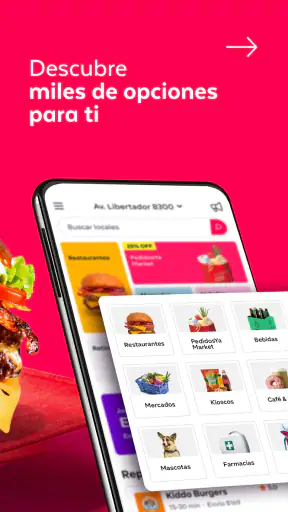




I started looking at PedidosYa - Delivery Online as a simple way to order dinner, but it quickly felt more useful as a shared household tool. In a home where one person chooses the meal, another checks the address, and someone else is waiting for groceries, having restaurants and supermarkets in the same Food & Drink app can remove a surprising amount of back-and-forth. My experience is that its value depends less on ordering once and more on how clearly everyone agrees on the account, the address, the payment step, and the final contents of the basket.
PedidosYa S.A. develops the app, which is free and available for Everyone. It has been around since March 12, 2012, and its current Android version is 10.32.10.4, supporting devices from Android 7.0 onward. Its scale is easy to understand from its presence on the platform: it has passed 50 million installs and holds a 4.6 average from around 2.2 million ratings. Those figures do not replace personal experience, but they do suggest that this is a mature service rather than a small experiment.
How it works when a household shares the ordering job
The most realistic use case for me is a busy evening at home. One person may be commuting, another may be looking after children, and a third may notice that basic groceries are missing. Instead of opening a restaurant app for food and a separate supermarket app for household items, I can use PedidosYa to browse both kinds of delivery in one place. That does not guarantee that every local option will be equally strong, but it makes the first step much simpler.
I find the app especially practical when the person placing the order is not the person who will receive it. A partner can choose the restaurant while someone working from home confirms the delivery details. A housemate can build a supermarket basket while another person checks whether the selected products make sense. This division works well only when the group treats the order as a shared decision rather than assuming that everyone sees every change instantly.
That is the first important household lesson: the app helps coordinate an order, but it does not replace household communication. Before tapping the final confirmation, I would send a quick message saying what is being ordered, where it is going, and who is handling the door. This is particularly useful in buildings with several entrances, homes with multiple residents, or shared devices that may still show an old delivery address.
Restaurants and supermarkets serve different needs
Using one app for takeout and groceries is convenient, but I do not judge both experiences by the same standard. For a restaurant order, I care about menu clarity, customization, timing, and whether the meal will still be enjoyable after travel. For a supermarket order, I care more about finding routine items quickly, checking quantities, and avoiding an unnecessary second trip to a physical store.
PedidosYa makes sense when I want one familiar starting point for either task. The trade-off is that a specialist restaurant app may sometimes present a particular menu more clearly, while a supermarket’s own service may be better for detailed product information or store-specific routines. I would choose PedidosYa for convenience and breadth, not because it automatically beats every direct alternative in every category.
There is also a useful distinction between urgent and planned orders. If I suddenly need dinner, browsing nearby restaurants can be faster than deciding what to cook. If I am restocking a household, I get better results by making a short list first and checking it before checkout. Treating grocery delivery like spontaneous takeout can lead to forgotten essentials, duplicate items, or a basket that costs more than expected once the total is reviewed.
What I would do before creating an account
On a shared phone or tablet, I would decide whose account is being used before anyone starts adding items. This sounds obvious, but it prevents a common household problem: one person assumes the account belongs to the family, while another assumes it is personal. The account holder should be the person who can reliably review the order, receive important updates, and recognize the delivery location.
I would also check the saved address every time the household moves between locations. A shared device can travel between home, work, a student residence, or a relative’s house. The fact that the app remembers an address can be helpful, but memory is not the same as correctness. Before ordering, I would read the delivery details as if I were a courier seeing them for the first time, including apartment information and any useful entrance note.
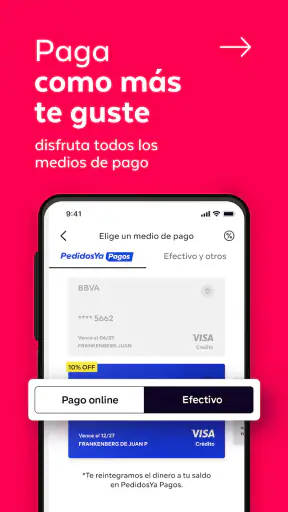
Payment deserves the same care. If several people use one account, everyone should know which payment method is selected and who is expected to cover the order. I would not leave that conversation until after the courier arrives. For a family, this may be a parent managing the account; for housemates, it may be one person ordering and collecting transfers later. The app can make the purchase convenient, but the reimbursement arrangement belongs to the people sharing the household.
My practical setup rule is simple: one clearly identified account, one confirmed destination, and one person responsible for the final review. If those boundaries are unclear, the convenience of a single app can turn into confusion. This is not a reason to avoid PedidosYa; it is a reason to establish a routine before treating it as a communal household service.
Keeping several people aligned during an order
Coordination is easiest when each person has a defined task. I might ask one person to choose the meal, another to check dietary needs, and the account holder to confirm the address and total. For groceries, one person can work through the list while another checks cupboards or the refrigerator. This avoids the familiar situation where two people independently order the same basics because neither knows what the other has already added.
I would be careful with last-minute changes. If someone edits the basket while another person is reviewing it, the second review may no longer be useful. A better workflow is to agree on a short “basket ready” message, then let the account holder perform the final check. This is a small habit, but it matters more on a shared device than on a personal phone.
For a family meal, I would confirm the choices aloud before submission, especially if children are involved. Children can help select an item, but I would keep the final decision with the adult responsible for the account. That boundary is less about restricting participation and more about preventing accidental orders, unsuitable food choices, or confusion about what has actually been purchased.
For housemates, I would record the split immediately after ordering rather than relying on memory. A short message listing the order and each person’s share is enough. PedidosYa is useful for placing the order, but it should not be treated as an automatic household ledger unless the people involved have separately agreed on how they track expenses.
Age, trust, and the right level of independence
The Everyone content rating makes the app approachable for a broad audience, but an age label is not the same thing as permission to make purchases independently. In my view, younger users can reasonably help browse food or groceries while an adult controls the account, the delivery details, and the final confirmation. That arrangement gives them participation without handing over responsibility they may not be ready to manage.
Trust also matters among adults. A shared login can be convenient, but it means that every user should understand what they are allowed to change. I would avoid letting an occasional user alter the account’s core details without telling the account holder. Even a harmless-looking address change can affect the next order, and a different payment selection can create an awkward disagreement later.
For older relatives, the app may be helpful when travel to a restaurant or supermarket is difficult. I would set up the process with them rather than ordering silently on their behalf. Confirming the meal, delivery location, and expected recipient helps preserve their choice while reducing mistakes. The best household arrangement is not necessarily the one with the fewest taps; it is the one where the person receiving the order knows what is coming.
I also prefer a clear boundary around account access on devices used by guests. If a friend or visiting relative wants to browse, I would let them look without leaving the account open for unsupervised checkout. This is ordinary digital hygiene, but it becomes more important when the app combines ordering, addresses, and payment-related decisions in one place.
Small habits that improve the experience
My first useful habit is to browse with a purpose. If I want dinner, I begin with the kind of meal and the number of people eating. If I need groceries, I make a short inventory before opening the app. This prevents the supermarket section from becoming an endless scroll and makes it easier to notice what is genuinely missing.
The second is to inspect the basket slowly. I check quantities, optional extras, delivery details, and the final amount before confirming. This catches the small errors that are easy to miss when ordering quickly, such as selecting a larger portion than intended or adding an item twice. A few seconds of review are more valuable than trying to correct an avoidable mistake later.
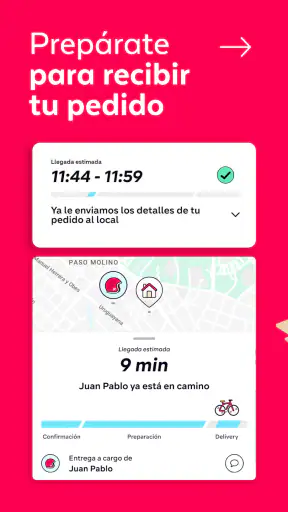
The third is to plan around the recipient, not just the buyer. If nobody will be home, I would not assume that a neighbor, reception desk, or family member can receive the delivery unless that has been arranged. In a shared home, the person who places the order should tell the recipient what to expect and when. This is particularly important when an adult orders for a teenager or when a housemate is asleep during the delivery window.
A fourth habit is to use the app differently for routine and occasional orders. For routine groceries, I would keep a household list outside the app and use the service to execute it. For occasional meals, I would spend more time comparing menus and deciding what travels well. This approach avoids expecting one browsing style to work equally well for a weekly restock and a spontaneous dinner.
Where the app can feel less convenient
The biggest limitation is that delivery convenience can hide decision-making effort. There may be many choices, but more choice is not always faster. When I am hungry, comparing restaurants, menus, portions, and delivery details can become tiring. A direct order from a familiar local restaurant may be better if I already know exactly what I want and do not need the broader marketplace.
There is also a household friction that no interface can completely solve: people may have different expectations about substitutions, portion sizes, dietary preferences, or acceptable spending. If one person chooses the basket and another receives it, disappointment can occur even when the order itself is handled correctly. I would discuss those preferences before ordering rather than blaming the app for a disagreement between users.
Supermarket delivery is not automatically the best choice for every shopping trip either. For a large planned shop, visiting a store may give me more control over freshness, brands, and last-minute comparisons. PedidosYa is more appealing when time, mobility, weather, or convenience matters more than personally selecting every item. That is a meaningful trade-off, especially for households that are particular about produce or want to inspect products themselves.
I would also avoid assuming that an app with a large user base will feel identical in every neighborhood. The practical experience depends on the local restaurants, supermarkets, delivery coverage, and the household’s own address. Someone in a dense area may find the choice more useful than someone with fewer nearby options. I see the app as a strong access point to local delivery, not a guarantee that every location offers the same range.
Who should use it and who may prefer another route
I recommend PedidosYa to people who regularly move between restaurant delivery and supermarket errands, especially households that want one familiar place to start. It is a good fit for busy couples, housemates, parents coordinating meals, and anyone who values having delivery options available without maintaining several separate apps.
It is also a sensible option for someone who occasionally orders for another person. The key is to confirm the recipient and address rather than treating the order as a private purchase. In my experience, the app becomes more useful when the ordering process is visible and agreed upon, not when one person quietly manages everything for everyone else.
I would suggest a different option when a specific restaurant’s own ordering system offers a better menu experience, when a supermarket’s direct service is important for detailed product selection, or when I am already making a physical shopping trip. I would also skip shared-account use if the people involved cannot agree on payment, address changes, or who has final authority to submit the order. In that situation, separate personal arrangements are clearer.
For Android users with an older device, the minimum requirement of Android 7.0 is worth checking before installation. The app is free to download, but free access should not be confused with a free order; the purchase itself still needs the ordinary review I would give any delivery transaction. I would inspect the basket and total rather than relying on the initial impression created while browsing.
My household verdict
After using PedidosYa as both a food-ordering app and a household coordination tool, I think its strongest quality is flexibility. It can handle the sudden “what are we eating tonight?” moment, but it can also support a more deliberate grocery run. Bringing those two needs together saves time for households that would otherwise switch between several services.
Its success at home depends on boundaries. I would keep one person responsible for the final confirmation, make the delivery address explicit, agree on payment before ordering, and let younger or less experienced users participate without giving them unchecked control. Those habits make the app feel calmer and reduce the mistakes that are usually blamed on delivery services but actually begin with unclear communication.
My final recommendation is positive, with a practical qualification: PedidosYa is best when convenience and coordination matter more than absolute control over every shopping detail. It is free, widely used, and mature enough to be a realistic everyday choice, but it is not a substitute for checking the basket or discussing household expectations. If you want one app for meals and supermarket needs, and your home can agree on who orders and who receives, I think it is worth keeping available.
For a shared device, I would treat it as a trusted household tool rather than an open communal account. That distinction gives everyone room to contribute while keeping the important decisions with the person responsible for the purchase. In that role, PedidosYa - Delivery Online feels less like a novelty and more like a useful part of a well-organized home routine.


